
Télécharger USB Loader GX v3.0 rev 1272
Fichier : USBLoaderGX r1272.7z Taille : 2.29Mo Description :
 USB Loader GX est un homebrew qui permet de lancer des backups de jeux Wii stockés sur un disque dur USB ou une clé USB, via une interface agréable affichant les jaquettes de vos jeux. Cet USB Loader est originalement basé sur l'USB Loader 1.1 par Waninkoko. Les backups sur carte SD ne sont pas supportés. ATTENTION: USB Loader GX Version 3.0 introduit un nouveau système de mise à jour automatique pas compatible avec les anciennes versions. (les anciens serveurs ne sont plus en fonctionnement) Si vous utilisez une ancienne version d'USB Loader GX, vous devez le mettre à jour manuellement. Pour cela il vous faut téléchargez la dernière version, puis effacez gxglobal.cfg de votre support SD/USB avant de copier le contenu de l'archive précédemment téléchargé (USB Loader GX 3.0). Fonctionnalités- Faites des backups et jouez à vos jeux Wii en utilisant un dispositif USB externe. - Faites des backups et jouez à vos jeux GameCube sur carte SD en utilisant DML (remerciements à l'équipe DML). - Homebrew et chaines de lancement: lancez vos homebrew et chaines favoris depuis le loader. - Formatages supportés: WBFS, FAT32, NTFS, Ext2/3/4. - Partitions multiples supportées en même temps. - 4 différents modes d'affichage: liste, grille, carrousel, chaine. - Affiche l'animation bannière comme sur le Système Menu Wii. - Jeux customisés supportés et filtrage avancé (par titre, genre, niveau de favori, catégories définies par l'utilisateur, etc.). - Détection/support des écrans larges. - Supportes multiples langages. - Supportes toutes les manettes (Wiimote, Nunchuck, Manette GameCube, Manette classique, etc.). - Mise à jour interne: Mise à jour de la dernière version depuis le loader (requiert une connexion Wifi active). - GameTDB: Renomme automatiquement tous les titres de jeu et récupères les infos des jeu (développeur, éditeur, genre, année, note, etc.). - Téléchargement des covers: téléchargement des covers 2D, covers 3D et images disque en original ou customisé. - Statistiques de jeu: vous montre combien de fois vous avez joué à un jeu, ajoute titre et temps de jeu et l'envoi au tableau de message officiel Wii. - Supportes les Gamer's Tags: Envoies votre dernier jeu joué au site qui créer les tags dynamiques et les signatures de forum. - Paramètres globaux et paramètres spécifiques aux jeux. - Emulation nand: Emule la mémoire interne de votre wii et archive les sauvegardes de jeu et chaines sur SD ou USB (espace mémoire Wii illimité). - Chargement dol alternatif: Plusieurs dols alternatifs sont automatiquement chargés si nécessaire. - Supportes le rechargement de dol des jeux. - Support Ocarina: Téléchargement et activation des cheat codes pour vos jeux. - Contrôle parental total. TutorielsTout sur Usb Loader GX - Partie 1/2 Tout sur Usb Loader GX - Partie 2/2 Utiliser le port 1 avec Uloader ou Usb Loader GX Tous les changements : http://code.google.com/p/usbloader-gui/source/list r1272 * Added 480p fix option for wii games Thanks to Extrems for the fix and Leseratte for the patch ! * Merged the libraries into the source instead of expecting them in libogc * Changed default loader's IOS to 58 (test), and default game's IOS to 249. * SVN un-ignored svnrev.h file to allow users to compile without sh script * Fixed a compile error: removed reference to unused LibWUPC library * Updated Language files: - French (Cyan) - Korean (DDinghoya) r1271 * Added a new Wiimmfi patcher function to support new Wiimmfi security for Mario Kart Wii. Big thank you to Leseratte who provided this update! r1270 Updating libraries : * Updated LibruntimeIOSPatch to 1.5.2 (Fix94) * Added Libdrc (Fix94) r1269 * Updated the custom banner URL (Thanks to Larsenv for the new host!) * Added WiiVC detection and LibDRC support (Thanks Fix94) * Updated LibIOSPatch to add WiiVC ISFS patches (Thanks Fix94) * Fixed Nintendont IPL and Rumble settings not being used. * Fixed booting Nintendont with WiiVC and HID devices connected (Thanks JacobM for extensive tests) Note that first HID controller port is always disabled when using WiiVC, you need to connect your HID controller in port 2. * Fixed multiple GPT partition numbering (untested) * Changed default EmuNAND path from nand/ to nands/01/ required by neek2o. r1268 * Removed LibWUPC now that Libogc supports WiiU Pro controller internally. r1267 * Set Nintendont as default gamecube mode for new loader install. Forgot the binary file for Libfat... * Added 2 new Nintendont settings (CC Rumble and IPL choices). (Greywolf) Libraries updates: * Updated Libcustomfat to 1.1.1 + Ustealth. (Greywolf, Cyan) Updated the project to compile with newer devkitpro versions. The new packages will be available in the files repository. * Updated devkitpro libraries to DevkitPPC r29-1, libogc 1.8.16 * Updated Libvorbis in devkitpro libogc. (Greywolf) * Updated libfat in devkitpro libogc to 1.1.1 + Ustealth patch * Updated tinyXML to tinyXML2 v4.0.1 (GreyWolf) 1262 * Fixed compiling meta.cpp under linux/mac * Removed Neek2o warning when using SD card on Wii. * Added A button to exit credit page (self_slaughter) Nintendont: * Updated to Config to v7 (self_slaughter) * Added Triforce Arcade mode option (self_slaughter) * Added compatibility for GPT and EBR partition type (v3.400+) * Updated language files: French 1260 * Fixed custom banner download issue introduced in r1259. * Fixed spelling mistake in image download function. * Reverted HTTP to non SSL revision (r1252). * Removed Nintendont internal update feature (requires SSL). * Added batch wad (un)install from a folder. * Changed the wad install menu interface. * Added an option to the wad class to display or hide errors on wad install. * Fixed RemoveDirectory return value. * Added game type and console name in exported game list. (requested) * Updated French language r1246 * Added support for wbfs/GameID6/ path * Updated custom banner URL (Thanks Abz) * Set default Wii disc dump mode to "Remove update partition" * Set default Nintendont MaxPad to 4 * Remove "shutdown to standby" choice on WiiU vWii. r1245 * USBLoaderGX installer: * Updated URL to sourceforge (Dimok) * Increased installer version to 1.9 r1244 * Fixed compilation warning (Thanks Greywolf) * Added current version and revision number to boot screen * Renamed "Gametdb Path" to "Titles Path" and set default path for title's files to /titles/ subfolder. * Added a prompt to move existing files when editing Titles path. (Greywolf) * Added an option to display Multi-disc prompt when launching gamecube games with DM/DML/Nintendont. * Fixed exiting the credit page (press B to exit) * Set Loader's IOS setting to 58 if only 58 is available. * Removed unneeded IOS58 patches to libruntimeiospatch Nintendont: * Added Nintendont 3.304+ new version detection. * Removed warning if HID is enabled without controller.ini on r3.304+. HID setting still used to copy .ini if needed. * Fixed Booting game from USB if not on the first partition. * Fixed loading settings/cheats/controller.ini when booting from Disc. * Added a missing warning message if kenobiwii.bin is not found but debug option is enabled on Wii consoles. * Updated French language file r1243 * Updated Libfat to 1.0.13 * Fixed compiling with DevkitPPC r27 (1 warning left) * Added throw exception to some buffers * Fixed DEVO config name r1242 branches: Updating LibFAT to 1.0.13 r1241 Changed partition detection for DIOS MIOS to allow logical partition located before primary partition. (Thanks RCJayce) * Changed partition detection for Nintendont to allow logical and primary partitions before the first FAT32 partition. (ex. NTFS primary+FAT32 primary) * Moved IsWiiU() function to sys.c * Fixed French language file r1240 Push r1239 in internal update menu and window's installer. Note: dol version only, not the full channel. r1239 Forgot a line... r1238 * Removed PS3 Controller support * Added a check on WiiU aspect ratio setting in features menu * Updated French and Spanish language file r1237 Revert internal update to r1233 because of reported issues with 1235. Currently investigating. Please don't use 1235 anymore. r1236 Push r1235 in internal update menu and window's installer. Added used libraries to /branches/libs/ You need to "make" and "make install" both libsicksaxis and libupc to compile USBLoaderGX r1235+ r1235 * Added WiiU pro controller support. Some menus or buttons might not work. (Thanks Airline38) L3+R3 to shutdown the pad. * Added PS3 controller support over USB, requires loader's IOS set to IOS58. Button mapped as Classic Controller. * Added a WiiU Auto aspect fixer based on current WiiU setting. * Added a WiiU Widescreen switcher in Features menu. Nintendont: * Fixed detection for nintendont v2.263+ issue 2294 * Added a WiiU Widescreen setting. issue 2296 Default value based on current WiiU aspect ratio settings. * Added a setting to choose Nincfg.bin behavior at launch issue 2297 Always delete; Always create; No change. * Removed unused game specific settings section (MGS2) * Renamed MCEmu ON setting to Multi * Added Disc launching feature * Added user prompt to select where MCEmu should be located when using Disc launching. The device is auto-detected if Gamecube source setting is set to SD or Main(USB) only. * Changed prompt type to warning if Nintendont version detection fails. Thanks to Airline38 for the WiiU pro base patch. r1234 *Fixed the compatible issue with Nintendont v2.264+ *Added a new option "Wii U Wide Screen" for Nintendont v2.258+ r1233 * Set default loader mode on fresh install to Wii+Gamecube. * Set video width to 694px (instead of 640px) when Wii set to 4:3 694 should look better. If you have crop issue, please report. * Updated French, German and Portuguese_br. Nintendont: * Updated Nintendont detection function (thanks Airline38) * Added Native controller setting. * Added Video Deflicker setting. * Removed forced MC Emu size when using a single card for multi games. * Added a warning when selecting a 2043 blocs MC Emu. * Removed forced Maxpad setting on WiiU * Removed forced controller.ini check on WiiU * Added controllers folder check (controller.ini has priority) * Fixed Video mode auto. r1231 * Updated default Gamecube Banner URL. * Added an URL auto-updater for users with the old GameCube banner URL. Devolution : * Added forced video mode to PAL60Hz 480i when playing NTSC games on a PAL console. * Added Crop Overscan and Disc Delay settings from Devolution r234 - For PlayLog setting, use USBLoaderGX Playlog setting. - "MemCard emulation on NAND" feature will not be added. Nintendont : * Added support for Nintendont v1.135+ * Added MemCard Emu "Multi" support, named "Enabled" like with Devolution (OFF > Individual > Enabled) (v1.135+) * Added MemCard Blocks size option (v1.135+) * Added specific game settings (Metal gear Solid) * Changed to use Argsboot method only if AutoBoot is set. r1230 Nintendont: * Added auto network initialization if needed when updating Nintendont from features menu. * Added a backup of existing boot.dol when updating Nintendont, restored if update failed. * Added Nintendont missing settings (MaxPads, LED, Log and OSReport). * Added a per game "Nintendont Loader Path" setting (Requested) * Changed Nintendont MCEmu setting to ON by default on new USBLoaderGX installation. r1229 Changes: * Updated DIOS MIOS (Lite) detection up to v2.11 * Homebrew's AddBootArgument() function now accepts struct as arguments (Thanks Fix94) Nintendont : * Always delete previous nincfg.bin file when launching a game. * Added Argument Booting method for nintendont v1.98+ (faster booting, no nincfg.bin file written to device) * Added "Update Nintendont" option in features menu. Issue 2260 r1228 * Fixed launching DIOS MIOS(Lite) with Ocarina. * Added a "Private server" setting to patch games at launch. Issue 2261 * Updated Chinese and French language files. r1227 Push r1226 in internal update menu and window's installer. Note: dol version only, not the full channel. r1226 * Forgot two changes in r1225. Not enough tests is bad... r1225 * Fixed Ocarina download from Geckocodes issue2253 (Thanks Gave92) * Added a check for downloaded Ocarina content (Thanks Airline38) * Removed Error #002 setting (Always set to Anti) r1224 * Merged Gamecube Video settings to a single option. If you used the option "Use game settings" you will have to fix your settings manually. Sorry, for the inconvenience. r1223 * Fixed an issue where setting files were created on SD if boot.dol was on USB (Thanks Badablek) * Added Auto-edition of meta.xml arguments based on internal user settings. * Added support for meta.xml arguments when rebooting the loader. Nintendont : * Added support for v1.20+ * Fixed launching Gamecube in FST format with nintendont (Thank VashTS) r1222 Push r1221 in internal update menu and windows installer. Note: dol version only, not the full channel. r1221 * Prevent downloading file if HTTP response code > 400 Nintendont : * Removed 32k/cluster limitation. * Fixed video mode setting "Auto". * Fixed loading cheats from the second device. r1219 - r1220 * Changed priority to cIOS instead of "IOS58 + AHB access" at launch if no argument is set in meta.xml. * Added an option to choose if HDD should be mounted on Loader's launch * Fixed installing games with no_split on NTFS partition if SD Card is inserted (Thanks Dimok) * Fixed a crash issue when plugging HDD after launch and mounting WBFS partition for the first time in HDD menu. * Fixed gamecube game's list when mounting HDD after launch. * Fixed automatic switching to channel mode if no USB device is detected. * Updated Gamecube custom banner's default URL for new install. * Added support for 302 Redirect HTTP error code (for users still using the old banner URL). * Updated runtimeiospatch to 1.5.2 * Replaced integer values with vector in credit page. Nintendont : * Removed SRAM patch (unused) * Added Nintendont svn support. (Tested up to r84) * Added Nintendont USB support. * Added a check for kenobi file presence when using Ocarina with DM/DML/NIN. * Added a check for controller.ini presence when using HID with Nintendont. * Added support for Nintendont "loader.dol" filename * Added support for r39 bootusb.dol and loaderusb.dol r1218 * Fixed missing games in "GameCube Delete menu" if the "GameCube Source" setting has USB priority. * Fixed Playlog writing when using Hermes cIOS v4 (untested) (Requires AHB access). * Fixed EmuNAND when using cIOS revision 65535 ( issue 2225 ) * Added Nintendont support: 1. Select Nintendont's boot.dol folder in userpath settings. 2. Set the "GameCube Mode" setting to Nintendont. 3. Nintendont share some of DIOS MIOS (Lite) settings. * Added sections in the Loader settings (Wii/gamecube/Devolution/DIOS MIOS/Nintendont). * Updated the GameCube game settings to display only the selected GameCube mode related settings. * Updated some menus to support more controller's input: - Prevent GC/CC X and Y buttons to change row number in Wall layout (use d-pad up/down only) - Added GC/CC support to carousel's arrow button - Added GC/CC support to Wall/Carousel continuous scroll (+/- on CC, L/R on GC) - Added GC support L/R and Start buttons in the settings/homebrew browser. - Added D-pad support in listing windows if not pointing the screen. The cursor now moves with the selection (not very good with high Overscan value) (issue 2093) * Changed the StartupProcess to speed up launch time by using AHB access to read config files. IOS argument in meta.xml has priority over AHB detection. * Added IOS58 + AHB support for launching the loader without cIOS (Wii games and EmuNAND still require cIOS). * Added a Loader's IOS setting (now Loader and Games use two separate settings: loader can use 58 and games 249). * Added LibruntimeIOSPatch to patch IOS58 and Hermes v4 to get ISFS access and enable Banner mode, Channel's title and System font with these IOSes (Requires AHB access) * Added a delete prompt if downloaded cheat file is empty. * Force all launched homebrew to reload to IOS58 if available. * Changed Gecko.c to send logs to wifigecko too. * Changed wifigecko IP to send logs to all IP 192.168.0.x * Updated French translation. r1217 * Changed how video mode is chosen by the loader PAL now really uses PAL Force Interlace now really use interlace Use Force480p if you want to force progressive Use Disc/console default for auto-detection This is experimental, please report your settings and tested game if you get blackscreen/freezes but same settings work with r1216 and you think you selected the correct video mode. r1216 * Improved GameCube controller functions (patch by Dynamit) R+Z=Screenshot, X=Gameinfo window, Y=Covers download * Added Classic Controller and GameCube Controller support in GameInfo window: Right stick=3D Cover movement, X=Flip 3DCover 180°, L/R=Zoom * Added Wifi6 and wifi10 pictures for GameInfo window. (Thanks OriginalHamster) * Added device priority selection for GameCube listing in global Loader settings (SD->USB, or USB->SD) * Added a "Use global" language setting for Gamecube games. * Added support for USB devices with modified MBR's signature to prevent WiiU's format message. * Prevent Rockband cursor display on GameCube and WiiWare games with "band" in the title (Crach bandicoot, Beach Bandits, etc.) * Added Dol's Video mode patcher in Loader/Game settings, for games which couldn't be forced. (MadWorld, MotoGP08, Mario Party 8, etc.) ♦ Region patch = Patches the dol's known video modes to the region selected in "Video mode" setting, but keep interlace/progressive references. ♦ ON = Patch all dol's known video modes to the one selected in "Video mode" setting. ♦ ALL = Patch all dol's found video mode patterns (even unknown video modes) to the one selected in "Video mode" setting. * DML: Updated DM(L) version detection up to v2.10 * DML: Automatically enable PADHook if Screenshot setting is enabled * DML: Fixed a bug where multiple video modes could be set at the same time * DEVO: Added a prompt if trying to launch a game from a non FAT32 partition. * DEVO: Added Direct Mapping Buttons setting (Devo r200+) * DEVO: Added support for Language setting * Language files updated: Chinese, French r1215 * Added QuadForce version detection up to v4.1 * Added QuadForce USB Support * Optimized DM/DML/QF detection code r1214 * Added QuadForce 2.0 version detection r1213 * Fixed NTFSLib's Mem2 Allocation (Thanks Dimok) * Fixed missing parent folder ".." when browsing a NTFS partition. * DML: Updated DM(L) detection up to version 2.9 * DEVO: Added F-ZeroAX and TimerFix settings (requires Devolution r196 or newer) r1212 Reverted more MEM2 Allocation to prevent black screen when launching a game. (Thanks Dimok) r1211 * Fixed USB Initialization when using usbport 1 (Thanks Dimok and Dynamit) * Fixed compiling on Linux * Added back support for WBFS partition without a partition table (Thanks PontoonAdmiral for the tests) * Fixed Wad installation on EmuNAND (both file decryption and file size) * Fixed channel's save path creation when using Emulated NAND * DML: Added Cluster size detection * DML: Updated DM(L) detection up to version 2.8 * DML: prevent NODISC2 patch if not using DM(L) v2.2 update2 * DEVO: Added Widescreen setting (requires Devolution r188 or newer) * DEVO: Added AHBPROT detection * Updated libntfs r1210 Updated LibNTFS to 2013-01-13 version https://code.google.com/p/libntfs-wii/ Added MEM2_alloc for Wii. r1209 * Fixed the bug introduced in r1208 preventing game launching with non d2x cIOS. r1208 * Fixed GameCube multiDisc installation. * Fixed progress window not hiding if Wiiload didn't send the file. * Simplify HBC loading logic. * Added a warning when trying to launch a Wii game with a non-d2x cIOS if EmuNAND is enabled. * Fixed individual game settings to allow modification of the EmuNAND settings based on the game's IOS instead of global IOS. * Added back cIOS rev17-21 support for EmuNAND Channel. issue 2152 (Thanks to Garfunkiel for the patch and to Themanuel for all the tests with game compatibility and partition detection) This hidden feature is unlocked only if all the user's setup is compatible with rev17-21: EmuNAND Channel path must be on the root of the first FAT32 partition on a 512 bytes/sector device. * DML: Changed the GameCube Multi-discs prompt logic to display on older DIOS MIOS (Lite) versions too. * DML: Added a partition type verification to warn the user if the HDD is not correctly setup. r1207mod1 I changed only the disc2 write error. r1207 * Fixed installation destination for multi-Disc based games. Second ISO is now properly going into the existing folder instead of using the Disc's internal Game Title. * Prevent deleting a folder when installation is canceled if the folder still contains another disc number. * Added a new setting to select GameCube game source: SD, USB, Auto Auto = based on DIOS MIOS (Lite). This new setting fix two known problems: - Device selection for Devolution is no more dependent of the installed DM(L) type. (Select manually before launching a game) - Installation of a game on a device if the game is already on another device is now possible. r1206 * Added possibility to install multi-Discs GameCube games * Added auto-detection and loading multi-Disc games with both Devolution and DIOS MIOS (Lite). The Disc 2 must be named disc2.iso and placed in the same folder than game.iso * DML: Prevent temporary ocarina .gct file copy if the game is launched from disc Note: If you use "GameCube compress" option (Extracted game format): - If one of the disc is already extracted, it will not allows you to dump another disc (as it's now using the same folder, it would overwrite files from the other disc) - If Disc 1 doesn't exist, it will tell you that disc 2 needs to be in ISO format, but will asks if you really want to install the game in extracted format. r1205 * Added support for Homebrew Channel v1.1.1+ * Added version detection for DIOS MIOS (Lite) v2.6 * Removed unused "DML NoDisc" setting r1204 * Reverted the video settings used by Wii games/Channels back to r1199. * Fixed greek.lang file to UTF8 * DML: Fixed a possible version detection error due to timezone. * DML: Fixed missing Widescreen in individual settings when using DML v2.1 * DML: Fixed individual settings choices for Japanese Patch. * DML: Added DML v2.5 screenshot setting (use R+Z on 4th controller) r1203 General: * Added Devolution version in Credit window. * Added Greek language file. You will need Hellenic font (Thanks nakata) * Changed default path for GameCube Main Folder to usb1:/games/ * Changed default path for devolution folder to be located on the boot device instead of SD. * Changed default URL for Channel's banner animation. * Fixed launching Korean games (Thanks damysteryman) * Fixed meta.xml release date format (Thanks Joostin) Devolution: * Added Devolution setting "NOLED" (and "WIDE" but not used yet). DIOS MIOS Lite: * Fixed DIOS MIOS (Lite) version detection when using a DM version more recent than the latest known. * Fixed DIOS MIOS (Lite) detection when booting without AHBPROT (Priiloader direct boot, old HBC, etc.) but with Waninkoko/d2x cIOS. * Removed "DML NoDisc+" setting when using DM v2.3+ * Removed warning messages related to individual game settings if they are currently unavailable. * Ocarina GCT folder can now be placed anywhere. If required, the .gct will be copied to a temporary file on the root of the game's partition. (no need to move the folder manually anymore) r1202 * Added DM(L) version detection and removed user setting. * Added a setting for DML Japanese Patch * Hide DML individual game settings if DM(L) is not installed or is not the correct version. * Fixed device selection when using USB with devolution * Fixed Devolution's launching and game region detection (Fix lag and wrong colors. Thanks to testers) * Prevent Playcount increasing if the game couldn't launch r1201 * Added a new option to Game Window setting to display banner animation only on Channels layout, other layouts use Rotating disc. * Added new Priiloader 0.8 beta4 compatibility to parental control setting * Added support for Devolution's smaller Memory Card size (min size = 512KB, 59 blocks) * Fixed the auto-completion search bug (Thanks to hvy109 for the patch) * Reworked GUI window for covers download and auto select all choices. Select HQ/LQ/custom/original priority in the GUI settings. * Added banner download from custom URL when GameCube mode is enable. Set the URL manually in the GXGlobal.cfg, http://URL/ will search for http://URL/ID6.bnr and http://URL/ID3.bnr Delete URL to disable banner download. Thanks to Abz for the default URL. r1200 * Added back "DML Video Mode" setting (Fix Mario golf) * Fixed in-game video mode (50/60hz) selection screen not displayed and fixed incorrect colors with DIOS MIOS. Please report any problem with Wii/Channel games. * Allowed Video Mode setting for Devolution instead of always forcing Disc default. * Added Japanese game fix for memory card access with DIOS MIOS. r1199 * Split NoDisc settings in two distinct options to prevent confusion. * Hide DM config v2 settings when using config v1 r1198 * Added new DIOS MIOS v2.2 update2 NoDisc setting. * Fixed Devolution config version number and removed forced Wifi logging setting r1197 * Added log over WiFi support for Devolution r100+ (always enabled). * Added DIOS MIOS 2.2+ support by adding a version selector in global Loader Settings. r1196 * I Forgot the added file in previous rev. r1195 * Fixed launching GameCube games from disc with official MIOS * Added Forced Language settings for GameCube games when using DM(L) * Fixed GameCube games video mode error with DML by removing forced progressive mode when using component cable. * Replaced the "Force interlace" by "DML Progressive Patch" (use it ONLY if you don't see any picture when forcing 480p) * Added a setting to choose whether to use MIOS or Devolution for GameCube games. * Added support for Devolution: - place Loader.bin from devolution sources in "DEVO Loader Folder". default folder is sd:/apps/gc_devo/ but you can change it. - You need to use the same folder layout than DIOS MIOS: /games/title [ID6]/game.iso - You need to place the second game disc ISO in the same folder than the first ISO (untested) - The Memory Card Emulation for Devolution can be: OFF (real Memory Card) ON (saved in /apps/gc_devo) Individual (Saved in the game folder) - Other settings have no effect in Devolution Mode. (no Ocarina/language/video force/etc.) r1194 - added support for Yaz0 decompression on banners and system menu resources (This is needed by some Custom Wii System Menu Themes like the DarkWii Theme. Hopefully now all System Menu Themes are supported as layout.) (thx darkwii and atymick for the info about the used Yaz0 compression in those themes.) r1193 * Wiki update: Fixed typo for GCReEx r1192 * Update menus to detect DIOS MIOS and DIOS MIOS Lite. (Thanks to Fix94 and Dimok). r1191 * Added quick support to DIOS MIOS r1190 * Optimizing previous changes (Thanks Dimok) * Fixed crashing problem when launching a game before banner caching is completed. (Dimok) * Fixed theme downloader stuck at 100% after unzipping. * Fixed prompt typo and prompt behavior when exiting the copy/delete GC menu. * Renamed string "Rename Game on WBFS" to "Rename Game Title". r1189 * Improved Category filtering. You can now easily hide games on category basis. Click on a category to cycle through possible checkbox states. The "ALL" category can now have 3 different states: [ ] Not checked = Doesn't display all categories (like before) [v] Checked = Displays all categories (like before) [X] Cross = Displays all categories except forbidden categories. The other categories now have 4 different states: [ ] Not checked = Games containing this category are not filtered (like before) [v] Enabled = All games containing this category will be displayed (like before) [X] Forbidden = All games containing this category will NOT be displayed. [+] Required = All games NOT containing this category will NOT be displayed. r1188 * Reverted fixed values from v3.0 * Added a Clock size factor (size factor is theme-able and will override user's value if not "1.0" in .them file) * Fixed tooltip opacity on Home Button and game icons on Channel grid mode. * Fixed Banner Grid position X and Y not working in .them file (Thanks Dimok) * Fixed half-cut cover in grid mode if only 4 games are displayed by showing it on both sides and allowing scrolling. r1187 *Updating languages for v3.0 r1186 *corrected language download link r1185 Wiki: copypaste bug r1184 Wiki: wrong filename fix. r1183 Update wiki pages for USB Loader GX v3.0 release. r1182 *updates files for windows installer r1181 Tag of version 3.0 USB Loader GX v3.0 r1180 USB Loader GX v3.0: Released on 2012 05 12 ATTENTION: USB Loader GX Version 3.0 introduces a new auto-update mechanism which is not compatible with old versions. (The old host is offline) If you are still using an old version of USB Loader GX, you need to update manually. Download the latest version or use our easy installer for Windows available on our website. http://code.google.com/p/usbloader-gui/downloads/list You can also check how to install or update manually here: http://code.google.com/p/usbloader-gui/wiki/Installation We are sorry for the inconvenience. New: - Added a new Layout: Channel grid mode! Channel grid displays games as channels and plays banner animations like the real Wii System Menu. Channel grid mode and banner animation requires AHBPROT flags to load resource files directly from your Wii. If you use an old HBC you should use our latest forwarder or update the HBC otherwise you wont have that support. - Added Channel launching from Emulated NAND. (big thanks to TriiForce guys and Miigotu) - Added GameCube games launching from SD Card through Dios Mios Lite (DML). (thanks to G0dLiKe, crediar, all DML devs and FIX94) Check DML website here http://code.google.com/p/dios-mios-lite-source-project/ - Added direct install/uninstall of WAD files to the Emulated NAND Channel path in the features settings menu. - Added a new icon in the toolbar to select the origin of the titles: Wii games, Channels from Wii, Channels from EmuNand, GameCube games. - Added the possibility to boot USB Loader GX without an HDD connected (It will fall back to "Channel from Wii" title's origin). - Added an option to choose which Game Window mode to use between the old "Rotating Disc" or the new "Banner Animation". - Added the favorite level setting to the game settings since it is no longer displayed when using "Banner Animation" game window mode. - Added an option to adjust the screen size for overscan TVs (Use negative values to shrink the display). - Added display of game's size from Wii disc games on the game window prompt (Rotating disc mode only). - Added a button in the search window to switch between "Beginning" and "Content" search methods. - Added auto-complete function to the search window. - Added a new GUI numpad for entering numbers. - Added setting for tooltip delay time. - Added resize of widescreen screenshots to 768px width. - Added cover download for the currently inserted disc. - Added delete of full cover on art work uninstall and game uninstall. - Added a parental control option to block priiloader override on return to system menu. - Added a prompt asking for downloading new language files when trying to update and no language files exist yet. - Added translation parsing for rating descriptors and for genres from wiitdb.xml. Requires a one time update of wiitdb.xml for cache rebuild. - Added a new option to force reading the game's titles from disc header. - Added renaming of internal TitleID of all HBC versions to JODI for GameTDB to find it. - Added a cheat update button to re-download the cheat text file. - Added a cancel button to several progress bar windows: Game installation, NAND extraction, etc. - Added separate path and setting for Emulated NAND Saves and Emulated NAND Channels. - Added per game NAND emulation path setting. - Added Mii extractor and SYSCONF file extractor to Emulated NAND. It always overwrites old files. - Added automatic Mii extraction on save game extract if the Mii file does not exist yet on Emulated NAND. - Added keep of AHBPROT flag on IOS Reload. Homebrews booted now have AHBPROT. (thanks to davebaol) - Added a new feature to force aspect ratio on games/channels. (thanks to giantpune for help with disassembler) - Added Zelda Skyward Sword Alternative dol offset (PAL and NTSC-U) for automatic dol selection. - Added detection of enabled cheat codes from an already created .gct file. - Added support for 2 USB drives for d2x cIOS (Requires d2x v9+). Changes: - Removed buggy focus system completely and added support to control screen pointer with analog sticks from respective controllers if the wiimote is not pointing to the screen. Compatible with Nunchuk, Classic Controller and GameCube controller. A speed factor is available in the GUI settings. - Restructured game's settings for different types of games (Wii/GC/Channels). - Added auto position of progress window messages in vertical direction depending of how many are used at the same time. - If "Titles from GameTDB" is not enabled the title will be read from the folder name if possible or from the game disc header. Title caching can still be used and is recommended in that case. - Settings title, keyboard text and key color can be changed by themes now. - Added optional background image for list/carousel/grid layouts (unused by default theme). - Use of old built-in font for credits window because it doesn't look good with the system menu one. - Removed the need of a cIOS to launch the loader (if anyone uses it with IOS58 for whatever reason). - Improved detection of game partition when starting the loader without configs (fresh start). - Isfs is now initiated once and deinitiated when cleaning up only, instead of the whole init/deinit every single access. - Updated file system libraries. - Removed pngu which is not needed, changed screenshot function to use libgd instead - added init of network into background thread so it is cancelable and has a timeout - changed wifi gecko to UDP socket - Converted all ogg sounds from 44.1 khz to 48 khz. - Optimized use of memory: Sizes over 30kb go to mem2 now first till it runs out ; Avoid use of mem2 area used on IOS_Reload (first 2 mb) ; Change font character texture to I4 which uses half as much memory (less cache memory). - Changed update function to get the files from googlecode website, since old update host website isn't accessible anymore. Fixes: - Fixed small scrollbar bug when having only 1 item. - Fixed reloading of cover image on game list when only 1 item is left after a change (e.g. filtering). - Improved calculation of progress speed. Now it is always the last 15 secs average instead of overall progress speed. - Fixed "new" game showing even with a parental control setting. - Fixed removing of unused cached titles on wiitdb load. - Fixed ocarina codes when using more than 255 codes (brawl+) (untested). - Fixed bug where entering "-1" (Use global) for cIOS was not possible in game settings. - Fixed playback of some BNS banner sounds. - Fixed reloading into another IOS before launch of game. - Removed buggy lz77 implementation and use the one known working. - Fixed launching of dollz compressed dol files. (thanks FIX94) - Fixed reading game's titles from disc header on fat32/ntfs/ext. - Fixed crash on missing <app> tag on meta.xml files. - Forwarder: Fixed crash on drives with physical sector size > 512 bytes. - Forwarder: Fixed endless waiting for slow HDD. (thanks to FIX94) - Forwarder: Added missing ext2 unmount. (thanks to FIX94) - Supports new WiiMotion+ controllers by using latest libraries. - Lots of string handling improvements (thanks to gerbilsoft for his patch) New Channel Grid Mode specific features: - New settings section for all banner's settings. - Use of BNR (banner animation) cache setting to load banners and icon's animation faster. (Enabled by default. Takes ~35MB/100 Banners) Wii games/Channels also accept ID3.bnr for custom-made multi-region banners. - BNR cache path setting. - Pulsing "new" icon on banner grid layout for new games. - Centering and size setting for banner's animation resources. - Channel's zooming speed setting. - Page's scrolling speed setting. New GameCube specific features: - Supports Dios Mios Lite (DML) v1.2+ - Uses of a custom banner for GameCube games which loads the game's internal opening.bnr informations (big thanks to diddy from the wiithemeteam for creating the brlyt/brlan for the banner). - DML settings editable from the loader (global and per game settings). - Supported formats for gamecubes are ISO/GCM and GCRegEx. - Custom game paths. The following paths are accepted: 1. configpath/ID6/ 2. configpath/ID6_Title/ 3. configpath/Title [ID6]/ 4. configpath/gamepath/ (slow loading speed) Accepted game's filenames: title.iso, title.gcm, GAMEID6.iso, GAMEID6.gcm - DML cheats now work the same way as for other Wii games, gct goes to "GCT Cheatcode Path" as GAMEID.gct - GameCube games copy from USB to SD on demand with choice menu to delete SD games to make space, If you want to use this feature then set the "Main GC path" to USB and the "SD GameCube path" to SD card. If duplicated games are detected on SD and USB, the games on SD will be prioritized. - Added GameCube disc dump functionality with multi-disc menu game selection, compress and align support (thanks to FIX94 and Overjoy for their disc dump sources on which this is based). - Use of the BNR cache path to load ID6.bnr or ID3.bnr if available for custom- made banners. (Loading only) - Video mode option to force interlace mode on GameCube. - Fixed force prog mode on DML 1.4 r1179 *lanuage files update (thanks to the translators) r1178 *fixed problem with loading wrong cheats instead of the selected *fixed possible problem in activating cheats for certain languages r1177 USBLoaderGX_Installer *add release version individual language download URL R1176 remove debug stuff R1175 *removed DML video mode setup, the main loader video mode is now used as reference *added an option to force interlace mode on GC *fixed force prog mode on DML 1.4 *fixed a bug in detecting new titles ("new" mark) *removed "Loader Mode" setting from global settings as it is setup on main view *removed "Search Mode" setting from global settings as it is setup on search window *corrected copy/paste bug in theme text *changed update function to get the files depending on the text file in the branches like the new installer (since old hoster isnt accessable anymore) *fixed missing OK button on prompt window on gc multi disc install r1174 branches: *add sources for WifiGeckoReader r1173 *preparation for new installer r1172 USBLoaderGX Installer: *added functionality to parse text file for revision and link *removed unneeded stuff and some clean ups r1171 little fix r1170 Add EasyInstaller NSIS Source Add EasyInstaller NSIS TEST Source (ver 1.5 and 1.6 both BUGGY) r1169 [No log message] r1168 more preparation for new update function r1167 preparation for new update function r1166 OK since the Wii System Menu Player is released now as I already mentioned the source for the loader will also be put on SVN again. Now that i am done with merging here is the MOD17 source. Changelog since last revision: - add banner/icon animation support for wii games / channels / gamecube - add custom banner for gamecube which loads the gamecube internal opening.bnr information (it is much better than the generic one of the system menu) (big thanks to diddy from the wiithemeteam for creating the brlyt/brlan for the banner) - add gamecube banner of system menu (not used right now since it sucks) - add banner grid of the system menu (resources loaded from nand) (with button highliter) - add big banner frame window of the system menu (resources loaded from nand). the banner window has buttons "Settings" and "Start" by default. if parental control is enabled the "Settings" button is replaced by "Back" - add play count text to the banner frame window (can be disabled as up until now in the gui settings) - add zoom in/out/scroll animations to banner grid and change into big frame window - add loading gc banners from ISO and DVD - add loading wii banners from DVD discs even if the game is not installed - add favorite level setting to the game settings since it is no longer on the banner frame window - add new settings section for banner settings - add option to choose between disc window and banner window - added back ehci module to support 2 usb drives and re-enabled the option - add option for 2 usb drives for d2x cIOS as well (will be supported in the future, not yet) - exchanged "GC Games" and "EmuNand Channels" on the game selection screen (more space for translators) - add and fixed gui numpad for entering numbers of any kind - add setting for tooltip delay time - fix reload of cover image on game list when only 1 item is left after a change (e.g. sort) - add use of old build in font for credits window because it doesnt look good with the system menu one - fixed effect bug when scrolling buttons in the settings and the wiimote is over button 1 - fixed bug where entering -1 (Use global) for cIOS was not possible in game settings - many source cleanups - add bnr chace setting - add DML configuration from the loader - removed creation of temporary "boot.bin" file - DML custom game paths. Additionally i added support for following forms of paths: 1. configpath/gamepath/game.iso 2. configpath/gamepath/game.gcm 3. configpath/gamepath/GAMEID6.iso 4. configpath/gamepath/GAMEID6.gcm Where gamepath can be anything you want inside the configure path in the custom path settings. I don't know if GCM files are allowed by DML but i just added support for it just in case. Changing path to USB is not blocked currently but games won't run from USB just keep that in mind. The "copy to SD before start" feature is not added yet. Listing the games should work though - DML cheats now work the same way as for wii, gct goes to "Cheatcode Path" as GAMEID.gct (same as on wii) - several DML internal configs are added as per game/global settings - added load of last cheat configuration from GCT files - added init of network into background thread so it is cancelable and has a timeout - added gc games copy from USB to SD on demand with choice menu to delete SD games to make space, SD games path can be chosen seperately from main gc path. all dupicate sd games are prefered then the main path to allow direct boot of games that are already on sd. main path can be on USB or anywhere else. - added gc disc dump functionality with multidisc, compress and align support (thanks to FIX94 and Overjoy for their disc dump source on which this is based) - added selection menu for gc multidisc which game to install - fixed loading game ID when it can't be read from path for GC games and with that loading the titles from GameTDB for them - lots of string handling improvements (thanks to gerbilsoft for his patch) - added gamecube banner cache loading (only loading) if available with GAMEID6.bnr or ID3.bnr in the banner cache path. wii games/channels also accept now ID3.bnr. - added several progress bar cancel buttons on some missing progress windows - improved calculation of progress speed. now it is always the last 15 secs average instead of overall progress speed. - added pulsing new icon on banner grid layout for new games - added resize of widescreen screenshots to 768 width - added mii extract on save game extract if the file does not yet exists - added mii extractor and SYSCONF extractor that always extracts and overwrites old files - changed wifi gecko to UDP socket - support for DML v1.2+ NOTE: Banner animation support requires AHBPROT flag to be enabled. If you use old HBC you should use our forwarder or update the HBC otherwise you wont have that support. I am hoping that now the themers and the translators can catch up with their stuff for the next upcomming official release. r1165 One of many to come ;) r1164 Forwarder: - fixed endless waiting for slow HDD (now really 10 secs timeout) - added missing ext2 unmount Thanks to FIX94 for pointing at those two bugs. r1163 Forwader: - fix crash on drives with physical sector size > 512 bytes r1162 Edited wiki page Introduction through web user interface. r1161 Created wiki page through web user interface. r1160 Created wiki page through web user interface. r1159 [No log message] r1158 Created wiki page through web user interface. r1157 Created wiki page through web user interface. r1156 Created wiki page to replace the "Updates/Activity" tab which google removed. r1155 *change font character texture to I4 which uses half as much memory (less cache memory) *fix crash on missing <app> tag on meta.xml files *removed pngu which is not needed, changed screenshot function to use libgd instead *fix gui freeze after uninstall *fix resorting of game list after uninstall *fix bug in aif decoding (fixes some banner sounds) *fix bug in wav decoding (fixes some banner sounds) *added new option to force titles from disc header *changed if "Titles from WiiTDB" is not enabled they will be loaded from directory names if possible (on force from disc that is not tried). *some language files update r1154 *updated file system libraries (see R1153) *fixed mount of game discs with virtual pointer r1153 branches: *updated libntfs-wii to version 2012.1.15 *updated libext2fs to e2fsprogs 1.42 *updated libfat to R4883 r1152 *Add DML support (thx goes to G0dLiKe, crediar, all DML devs and FIX94) *restructured game settings for different types of games (Wii/GC/Channels) *added uninstall option for emu nand channels and game cube games (iso only) *add display of game size from wii disc games on game prompt *add game size display for game cube games (iso only) *force interlace mode on GC games except when explicitly used FORCE 480p PAL/NTSC *removed mountMethod global variable which was annoying me very much *some source cleanup r1151 * fix portlibs in the makefile, yet again r1150 *added option to adjust screen for overscan TVs *optimized use of memory (sizes over 30kb go to mem2 now first till it runs out) *avoid use of mem2 area used on IOS_Reload (first 2 mb) *fixed bug in aiff sound playback. breaked some banner sounds *fixed boot of We Dare again (stupid channels added in the pattern again :P) *unmount the usb partition used for nand emu and remount it after activating nand emu (fat32 cache flush) r1149 *fixed possible crash in grid layout *change default virtual pointer speed to 0.18 *added instruction invalidation of dol areas before starting them *corrected PAL60 system default video mode set *fixed loading titles when titles from wiitdb is OFF *removed buggy lz77 implementation and use the one known working *fix small scrollbar bug when having only 1 item *fix launch of dollz compressed dol files (thx FIX94) r1148 *added ability to boot main.dol directly for channels (real and emu). The launcher method can be setup in the loader setting. *added channel hooking (real and emu). *proper catch of none existing cheats on server if file is not found *added back channel nand emulation mode and per game nand emu settings for channels (emulation mode can't be set to OFF for emu channels) *improved handle of cached titles. (on first boot of this revision the cache title file will be renewed) *settings title, keyboard text and key color can be changed by themes now *added optional background image for list/carousel/grid layouts. The files do not actually exist in the loader. They are loaded if they exists otherwise the default background image is used.See here for filenames: http://code.google.com/p/usbloader- gui/source/browse/trunk/source/themes/filelist.h?r=1148#776 *add flush of homebrew memory before launching app_booter *change: if titles from wiitdb is not enabled the title will be read from game disc header on /title [ID6]/[ID6].wbfs (iso/ciso) pattern. Title caching can still be used and is recommended in that case. *added keep of AHBPROT flag on IOS Reload. Homebrews booted now have AHBPROT. (thanks davebaol) *fixed loading ocarina files from SD when doing nand emulation from SD *fix port libs includes reference in Makefile r1147 *fixed reading game titles from disc header on fat32/ntfs/ext ( Issue 2034 ) *moved low mem and video setup for channels after loading the dol (fixes/corrects video mode, little video flash on startup of channel and might fix some other stuff. hopefully doesn't brake some channels) *removed duplicate memory flush/patches *code optimizations r1146 *Fixed Save game extraction for channels. It will extract to EmuNand Channel path. *Fixed Ocarina code downloading for Channels. *Moved portlib reference in makefile to fix possible compiling errors. Thanks to Dimok for all those changes) *Update French and Italian language. r1145 *Language update. (Dutch, French, German, Italian and Japanese) r1144 *bugfix on variable update when installing wad (small cleanup right before commit without test :\) r1143 *Added direct install/uninstall of wad titles to the emulation nand path in the feature setting *removed source for wad installation to real nand completely *apply of title rename to cached titles *add listing of 00010004 titles on real nand *add rename of internal used id of all HBC versions to JODI for GameTDB to find it *converted all ogg sounds from 44.1 khz to 48 khz *some source cleanup/movement r1142 *fix false loading of custom dip module on d2x cIOS / ISFS_Init and ISFS_DeInit was missing *changed install game function to call to be equal on + button and from the new disc prompt *fix for ocarina codes when using more than 255 codes (brawl+) (untested) *fix crash in HDD settings when no HDD is initialized *add complete remount on USB on WBFS_Reinit in case the drive was not in the wii usb port on loader startup but inserted afterwards r1141 *added nunchuck to control of virtual screen pointer and removed it from control of list up/down scrolling and carousel *fixed crash with 3D cover grabbing (old pointer method was still used) *some clean up r1140 [No log message] r1139 *removed buggy focus system completely (it was never working correct) *added support to control screen pointer with gc pad or classic controller. you are always able to control as long as the corresponding wii control does not point to the screen (e.g. wiimote 1 not pointing to screen -> gcpad/classic controller 1 can control pointer 1). a speed factor is added to the gui option. need feedback about a proper default value, currently 15% (only tested gc pad on dolphin-emu) *fix reinit of cheatcount on download of new file *moved installation window to be on top of main window *added game installation cancel *added nand extract cancel *added back extract of save feature for a real nand channels *added auto position of progress window messages in vertical direction depending of how many are used at the same time r1138 *removed necessary syncing of partition header on installation of games (fix for the long wait on 100% game install) *added init of the game partition uppon starting a game install without previously having the "wii game mode" *added cheat update button to redownload the cheat text file *the partition size text is now only shown if the partition was initialized *fix in return to patch (bug added with r1135). the old method of patching was always used even on d2x. *a few code cleanups r1137 *added import of channel type on category import from GameTDB (VC-N64, WiiWare.....) *added translations parse for rating descriptors (not used yet) and for genres. requires one time update of wiitdb.xml for cache rebuild. *fixed a few mem leaks in GameTDB parser r1136 *added new feature to force aspec ratio on games/channels (global and per game setting) (thx giantpune for help with disassemble) *added refresh of partition size when activating wii games mode from none wii games mode *fixed playback of some BNS banner sounds *moved every allocation used during or after apploader to mem2 (fixes some memory overwrites problems by the apploader) *improved detection of game partition when starting the loader without configs (fresh start) *fixed remove of unused cached titles on wiitdb load *removed unused settings for channels from the per game setting *changed default partition to 0 when starting with fresh settings (instead of -1 wtf?) r1135 *fix reloading into another IOS before launch of game *add loading of wii games / nand channels / emu nand channels in all combinations into one list *add button on main view for quick choice between the combinations of the three *add "Real Nand" or "Emulated Nand" text on the game window prompt when starting a channel *removed the need of a cIOS to launch the loader (if anyone uses it with IOS58 for whatever reason). The warning that a cIOS is needed is still present. *removed support for both usb ports at once on hermes cIOS. Each can still be used individually but only one at a time. This is done because of some bugs in the new ehci module which make some games unbootable. The ehcimodule is now reverted to the last working one. Need feedback if the games work fine again. *some preparations for the upcoming stealth mode feature of the d2x cIOS *isfs is now initiated once and deinitated when cleaning up only (instead of the whole init/deinit every single access) *removed choice for emulated nand channel modes. Emulated nand channels always need full emulation which is now always used on emu nand for channels. r1134 - add check for the covers of the currently inserted disc to the cover downloader (is checked with the other games in the list) - fix booting wii discs when starting without a HDD (channel mode) - add parental control option to block priiloader override on return to system menu - add prompt asking for downloading new language files when trying to update and no language files exist yet - reduced amount of checks for inserted disc (now every 100ms) - fixed booting gamecube games (datatype bug for mount method) - fix winnertag for gamecube games - add per game nand emu path setting r1133 *Add boot without HDD connected (channel mode is fallback). Timeout of 20 secs still comes up on start but you have now the chance to cancel it by pressing B (with a message ;-)) *Optimized TMD loading. Removed unnecessary accesses to it. *Fixed ocarina path loading for channels *Optimized device shutdown before game/channel start *A few code optimizations r1132 * minor optimization - make LIMIT not evaluate stuff like "atoi(balbla+strlen(stuff))" 3 times r1131 * change makefile to allow using the portlibs folder for the ported libs r1130 *Fixed ocarina not loading the gct file. *Added Zelda Skyward Sword Alternative dol offset (PAL and NTSC-U) *updated French, Japanese and Italian language. r1129 *Added banner sounds for channels (emu and real nand) *few cleanups r1128 * added nand channel emulation (big thanks to TriiForce guys and Miigotu for laying out the foundation) * added direct list of emu nand channels without activating emu nand (for speed up) * removed autoclose of search bar and changed the search engine to have both methods * added setting for switching "Beginning" and "Content" search methods and a quick switch button on search window * added autocomplete if only one search character is available and more than one match * added seperate path and setting for emu nand channels/saves * added caching of emu nand channel titles * fixed a few alignment issues when activating emu nand (thanks daveboal) * some minor clean ups TODO/Next Rev: * add channels banner sounds * remove unneeded game settings options on channels r1127 Searchengine changed: now find games, that hath the search string in it. e.G. "SPOR" find "ea SPORts", "mario SPORts mix", "SPORe heros" and so on. r1126 *Updated language files for v2.3 and current trunk revision r1125 *Update and fixed a few thins in libext2fs-wii. For changelog see r1124 *Reverted fixed values of release version and redirected language files download to trunk again *Added delete of full cover on art work uninstall and game uninstall *Added delete of CSettings object on compiling for another IOS than 249 Version 2.3 rev 1121 à 1123 -Ajout de la possibilité d'utiliser la police de caractères du Menu Système interne de la Wii (remerciements à giantpune et à r-win). -Ajout message approprié pour installer la barre de progression afin de montrer quand l'installation est finie. -Ajout d'option GUI pour l'affichage du nombre de fois joué à jeu. -Ajout de l'option "Se souvenir du déblocage" dans le menu du contrôle parental pour savoir si le mot de passe doit être toujours actif si le mot de passe est défini. -Ajout du remplacement de la fonction de "Retour au menu Système Wii" de Priiloader. -Ajout de différents hooktypes et du wiird debugger (merci à GeckoOS pour les sources). -Ajout émulation de NAND pour rediriger accés NAND de la Wii vers SD ou USB. NandEmu redirigé vers sd:/nand/ (Nécessite d2x cIOSv7 alpha ou plus récent). *Emulation partielle: Charge et sauvegarde les sauvegardes de jeu dans le chemin NandEmu choisi plutôt que dans la mémoire interne de la Wii. Les Mii, la configuration de la Wiimote et de la Wii sont chargés depuis la "vraie" Wii. *Emulation totale: Charge tout depuis le chemin défini par NandEmu plutôt que de la mémoire interne de la Wii. Attention: Si vous jouez sur la Wii de quelqu'un d'autre, vous aurez besoin d'utiliser votre propre Wiimote et votre réseau risque de ne pas marcher. -Ajout des caractéristiques provenant de la NAND extraite. Vous pouvez tout extraire ou choisir un chemin de direction vers un dossier ou le fichier à extraire. -Ajout d'un menu d'extraction de sauvegarde de jeu pour extraire tous les jeux sauvegardés provenant de la "vraie" NAND jusqu'au chemin choisi vers NandEmu. -Ajout d'une extraction de sauvegarde de jeu vers le chemin défini par NandEmu par jeu. -Ajour réglages NandEmu, Hooktype, WiirdDebugger par jeu . -Ajout de la possibilité d'une réinitialisation réseau (Bouton Wifi dans le lanceur de l'homebrew ). Changements: -Utilisation d'une nouvelle application pour booter les homebrews ( se référer au ChangeLog de WiiXplorer ).
 -Rechargement pour inclure les IOS au démarrage de l'homebrew plutôt que de le démarrer avec un cIOS . -Suppression de la limite de fichiers .csv et .txt dans la liste de création de jeu. -Les caractères entrés dans le champ du mot de passe sont maintenant cachés. -Détection améliorée de la présence ou non de code en fichier .txt. -Forwarder : Centrage de l'image de fond et correction de l'aspect de l'écran. Corrections: -Bug format META.xml corrigé. -Pas d'essai de chargement du périphérique lorsqu'aucun disque n'est inséré dans le lecteur . -Problème résolu en ce qui concerne le navigateur de fichiers, celui-ci ne revient pas au premier dossier d'entrée ou dossier modifié. * Fixed url for wiitdb.zip * Added possibility for network re-init (Wifi-Button in Homebrew Launcher). Kills and re-inits network completely. Good for initialization failures. * Release preparations Release Candidate 1: *Changed everything from WiiTDB to GameTDB (using new host and name) *Added quick switch between system font and old font (fixed memory leak in font change) Version 2.2 rev 1099 New : Added game categories and filter games list by categories (Can be imported from WiiTDB). Wiinertag support. Supporting arguments from meta.xml on boot (--ios=xxx and --usbport=x) (Requires Homebrew Channel 1.0.7+ or UNEO Forwarder v3.0). New ehci modules by Rodries with better drive compatibility. Added two new video modes to force progressive video mode, 'FORCE PAL480p' and 'FORCE NTSC480p'. Added Sneek Video Patch mode. Added new 'Inherit' setting for game settings named "Use global". If that option is set then the main loader setting is used. Full d2x cIOS support with it's new features (Block IOS Reload, Return To, Sector Sizes > 512). Support for sector sizes > 512B with FAT32/NTFS (Requires d2x v6+) Real support for simultanious use of both USB ports without switching the 2nd drive temporary off. (Requires Hermes cIOS or Rodries MOD of the Hermes cIOS (recommended)) (thanks Rodries) Added two new settings menus Added saving of game browser position when returning to USB Loader GX Changes : Improved several GUI controls/navigations Changed settings menu layout and sorted the items to their correct place (HDD menu, features menu) Set games settings to use the global setting by default, set to "use global" to use the main loader settings. Use TinyXML instead of MXML (better XML support) Updated to new libs (libogc, libfat, libext2fs, libntfs) Fixes : "Return to" option now work for all games, even problematic games like Prince of Persia. (Requires d2x v4+) Xflip setting fixed. Fix the parental lock of Individual game settings (Thanks to NJ7) Fix Theme downloader Fixed reset of the loader when loading game with IOS reload and disabled WiiTDB titles Fixed timeout timer on startup to count correctly. Fixed reversed disc image download when Custom/Original option is selected Fixed reload of game list after a game rename Fixed horizontal text scrolling Fixed booting games by arguments (headless id feature) Fixed We Dare game boot (thx oggzee) Fixed "Block IOS reload" feature in game settings to allow dol reloading game to work without selecting an alternate dol (Requires d2x v6+). R1099 Change Log: *Added IOS225 from Rodries cIOS Installer MOD to Hermes IOS types New Forwarder V3.0 Changes: *added support for ext partitions *added support for arguments from xml *clean up of source Rev 1091 - Correction d'un crash avec le bouton déverrouiller - Correction des titres des paramètres de fonctions Entre Version 2.1 Rev 1087 et Rev 1090 - fixed XFLIP_WTF setting (Cyan) - fixed crashes on category add/delete/rename - changed icon of category rename and mapped triggers +/-/1 to the buttons - fixed green bar flash on game start - fixed freeze in STATE_DISABLED when leaving->entering->saving game settings - separated a few settings from the GUI setting and created a "Feature" settings menu - Updated language files - Added Wiinnertag support. NOTE: When you enable the Wiinnertag in the settings a prompt will come up if the Wiinnertag.xml does not exists in the setup path for it. This prompt will ask you if you want an example file created by the loader which you can adjust to your account (I suggest you create one on first use). Multiple/Other tag sites can be setup in the xml file and loader will execute them all one after another. Also Wiinnertag requires a network connection established to be working. When you enable this feature and auto network init is disabled you will be prompted to enable it. - Created an automatic resource list generation script which is executed when files are added/removed - Created an own class for the homebrew prompt - Created scrollbar class which is now used on every browser - Created a checkbox browser list class - Changed the category prompts to the new list mode - Improved B-Button scrolling - Fixed horizontal text scrolling - Fixed possible crash on long text display - Many internal gui changes and navigation changes - Fixed booting games by argument (headless id) - Fixed SD Reload button to really reload the SD after it was ejected - Added booting with arguements from meta.xml for homebrews - Added some arguments acception from meta.xml to our app. "-ios=xxx" and "-usbport=x" or "--ios=xxx" and "--usbport=x" can be used. -usbport is for Hermes cIOS to decide which usb port to use on startup. The ios is the boot IOS on startup, it always overrides the compiled boot IOS into the application. - Added a global block IOS reload option which is set default to "Auto" (Auto = on d2x cIOS >= V6 enabled, every other cIOS disabled) - Fix for some IOS Reload games - Updated libext2fs - Updated libntfs - Updated language files - Skip spaces at the end of a category in WiiTDB (e.g 'Rhythm ') - Change in nand title search (fixed bug which can find wrong nand title and set it as return to) - Fixed bug when a wiimote leaves the game list choice and returns to it without going over another game that game was not clickable - Changed search bar to clear text on [X] button click. search bar is now closed by pressing B Version entre 2.1 et la rev 1086 - Amélioration du support des cIOS d2x et Hermes. - Ajout du "Retour au loader" pour d2x. - Ajout du "block ios reload" pour le cIOS d2x permettant de jouer aux jeux tels que les experts. - Diverses autres choses. Version 2.1 - Plus besoin de patch .wip pour NSMB - Les jeux marqués "NEW" apparaissent aussi dans le mode favoris - Contrôle parental individuel pour chaque menus et boutons - Lorsque vous supprimez un jeu, il vous est demandé si vous voulez tout supprimer avec (covers, cheats, etc...) - Ajout du support de partitions multiples: si vous avez des jeux sur les différentes partitions du DD, ils seront tous listés sur la même page - Ajout du support de l'USB 1 (seulement avec les cIOS Hermes) - Ajout du support d'utilisation des deux ports USB à la fois (seulement avec les cIOS Hermes) Utilisez cette option avec l'option "Partitions Multiples" pour lister tous les jeux de toutes les partitions des deux ports USB à la fois - Ajout d'un cache des titres de jeux. Cela rend le démarrage du loader plus rapide. Possibilité de désactiver cette options dans les paramètres. (voir le changelog en entier) Version 2.0 (Révision 1036) - Refonte complète et nettoyage des sources !! Pour résumer, voici les ajouts/modifications principales : - Support du lancement des jeux sur FAT/NTFS/EXT2/3/4. - Compatibilité pour toutes les versions de cIOS de Waninkoko et Hermes. - Retour au loader depuis un jeu lancé. - Démarrage sur NTFS/EXT et sauvegarde des images/configs dessus. - Plus besoin de partition FAT32 maintenant avec le nouveau forwarder et une partition NTFS. - Titres des Jeux et informations depuis WiiTDB (Tous nos remerciements vont à lustar pour sa magnifique page http://wiitdb.com) - Nouvelle barre de recherche pour rechercher dans les jeux. - Support des dol's alternatif. - Téléchargement de Thème. - Refonte du contrôle parental. - Lancement d'Homebrew fonctionnant pour la grande majorité d'entre eux. - Support de nombreux nouveau slot d'IOS (depuis 200-255). - Sons des bannières de jeu. - Repérage des nouveaux jeux installés. - 3 mode de présentations des jeux différents. - Énormément de correction de bugs. Révision 935 - Ajout d'un patch automatique pour Prince Of Persia. Celui ci est désactivé si vous avez un fichier .wip pour le jeu. - Nettoyage du code de l'apploader. Révision 934 - Changement de l'outil de mise à jour bêta. Vous devez mettre à jour manuellement pour avoir les mises à jour bêta prochaines. Révision 933 - Désactivation de l'écriture NTFS car l'installateur de jeux est toujours instable. Passage du montage ntfs en lecture seule. - Augmentation de la taille de mémoire cache pour les montages de nouveau. Ceci accélère tout, surtout sur la carte SD. - Correctif d'un bug lors de l'utilisation de Ocarina + dol alternatif (ne se lançait pas du tout). Révision 932 - Correction des fichiers Wip. 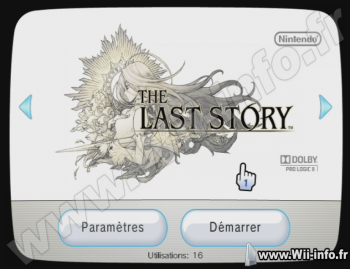 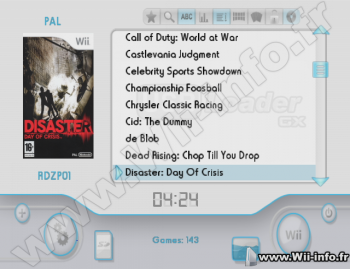 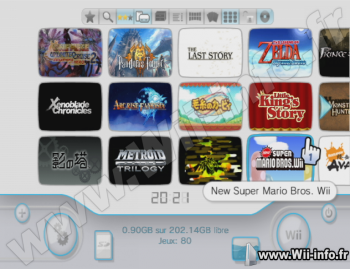 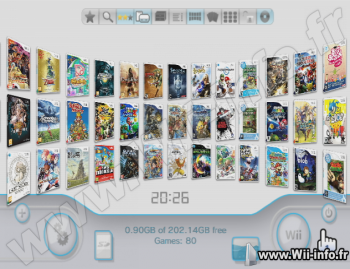 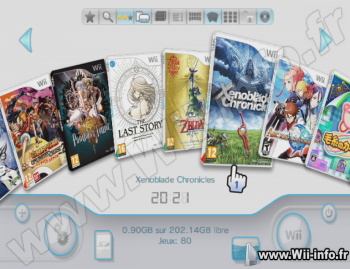 Homebrew (déjà réglé sur la langue française), forwarders Wii et vWii contenus dans l'archive. Télécharger différents thèmes  Changement : https://sourceforge.net/p/usbloadergx/code/commit_browser Site officiel : http://usbloadergx.koureio.net/ Site officiel : http://gbatemp.net/threads/usb-loader-gx.149922/ Site officiel : https://sourceforge.net/projects/usbloadergx/ Changement : https://sourceforge.net/p/usbloadergx/code/commit_browser Site officiel : http://usbloadergx.koureio.net/ Site officiel : http://gbatemp.net/threads/usb-loader-gx.149922/ Site officiel : https://sourceforge.net/projects/usbloadergx/  Télécharger USB Loader GX v3.0 rev 1272 Télécharger USB Loader GX v3.0 rev 1272Les fichiers avec l'extension 7z se décompressent avec winrar ou 7zip. 2502 commentaires Pages: 1 2 3 4 5 6 7 8 9 10 11 12 13 14 15 16 17 18 ... 66 67 68 69 70 71 72 73 74 75 76 77 78 79 80 81 82 83 84 Messages:
Pages: 1 2 3 4 5 6 7 8 9 10 11 12 13 14 15 16 17 18 ... 66 67 68 69 70 71 72 73 74 75 76 77 78 79 80 81 82 83 84 Ajouter commentaire: Créez un compte ou identifiez vous pour poster un commentaire. Pour votre téléphone, Jailbreak iPhone et Jailbreak iPad. - Hack PS3 - Hacker sa WiiU - Hacker PS Vita - Rage Comics, troll face - Retrouvez chaque jour des image drole sur internet grâce à LOLTube. - Meme Internet | ||||||||||||||||||||||||||||||||||||||||||||||||||||||||||||||||||||||||||||||
 1141 (68%)














 moi j'ai bien fait comme tu as dit daadaa mais les images apparées pas
  ok les images disc ont bien été télécharger.merci

| 51 connectés (0 membre, 51 anonymes) | © 2007-2015 Attila |